How often should you redesign your website: Signals and Timelines

"How often should you redesign your website?" If you ask around, you'll probably hear the same answer: every 2-3 years. It's a common industry benchmark, but honestly, it's a bit outdated. The real answer is much more about strategy—it depends entirely on how your website is performing and what your business needs to achieve.
The Real Answer to Redesigning Your Website
Think of your website like your home. Sometimes, all it needs is a fresh coat of paint or some new furniture. Those are your small, incremental updates. But other times, the foundation is cracked and the plumbing is shot. That’s when you need a full-blown renovation—a complete redesign. The trick is knowing which one you need and when.
The first step is to stop thinking about a redesign as a calendar reminder and start seeing it as a critical business decision driven by data. Instead of just picking a date, you need to look for specific signals that tell you it's time for a change. These warning signs are your website’s way of asking for help, and if you ignore them, you could be facing lost traffic, frustrated customers, and a lot of missed opportunities.
Beyond the Calendar Date
Now, that 2-3 year rule of thumb didn't come from nowhere. It’s true that many businesses plan major overhauls within this window. The average website lifecycle is about 2.5 to 3 years, and industry research shows that a whopping 80% of redesigns are kicked off by an outdated look or a brand refresh. It makes sense; when you consider that a big redesign can easily take more than six months, most companies would rather tackle it in multi-year cycles. You can dig into more of these website design statistics to see why this timeline became the standard.
But here’s the thing: blindly following a schedule is a passive, and frankly, risky approach. A much smarter strategy is to actively monitor your website's vital signs. These metrics give you the hard evidence you need to know when something is truly broken.
A website redesign should never be based on a feeling or a date on the calendar. It should be a direct response to a measurable problem—whether it's declining conversions, poor user engagement, or technology that no longer supports your business.
To help you decide, here's a quick breakdown of general timelines versus specific performance triggers.
Quick Guide to Redesign Cadence
| Guideline Type | Recommendation | Key Takeaway |
|---|---|---|
| Time-Based Benchmark | Every 2.5 to 3 years. | A common cycle, but it's a passive approach that can miss urgent issues or waste resources on unnecessary changes. |
| Data-Driven Triggers | Continuously monitor key metrics. | A proactive strategy that ties redesign decisions directly to performance, ensuring you act only when there's a real need. |
This table shows why it's so important to shift your focus from the calendar to your data. The "when" becomes a lot clearer once you know what to look for.
Key Areas to Monitor
So, how do you move from guesswork to a clear-cut decision? You start by focusing on the core jobs your website is supposed to do. Are these areas running smoothly, or are they starting to show their age?
-
Performance and SEO: Is your organic traffic dropping? Are your keyword rankings slipping? Most importantly, are your lead generation numbers going in the wrong direction?
-
User Experience (UX): Is your bounce rate through the roof? Are people visiting your site but leaving without filling out a form, making a purchase, or taking that next step?
-
Technology and Functionality: Is your site painfully slow? Does it look broken on mobile devices? Is it built on outdated software that’s becoming a security risk?
-
Brand and Business Alignment: Does your website still look and sound like your company? Does it accurately reflect your current services, messaging, and values, or does it feel like a relic from the past?
By keeping an eye on these signals, you can stop asking "how often" and start asking the more important question: "why." This guide will walk you through how to read those signals and make a smart, strategic choice based on your website's actual performance.
Key Signals Your Website Needs a Redesign

Instead of just circling a date on the calendar, you should let your website tell you when it’s time for an update. The best way to think about it is to treat your website like a key employee—if it stops doing its job well, you have to step in. Your site is constantly giving off signals about its health, and learning to read them is the secret to knowing how often you should redesign your website.
These signals aren’t hidden in some secret code. They’re right there in your analytics, in customer feedback, and sometimes, it's just that gut feeling you get when you see your site next to a competitor's. By paying attention to these dashboard warning lights, you can stop guessing and start making decisions based on real data.
Your Performance Metrics Are Declining
The clearest signals come straight from your data. Numbers don't lie, and a steady downward trend is a pretty loud cry for help. If your website isn't pulling in the results it used to, it’s a good sign that something fundamental is broken in its design or functionality.
Start by digging into these critical performance indicators:
- Declining Traffic and SEO Rankings: Is your organic search traffic slowly leaking away? Are you losing your top spots for keywords that were once a sure thing? This often points to a site structure, content strategy, or technical SEO that's fallen out of sync with what search engines want.
- Low or Falling Conversion Rates: Your website has a job to do, whether that’s getting leads, making sales, or getting people to sign up. If fewer and fewer visitors are taking that final step, your design, messaging, or user journey is probably creating friction instead of paving a smooth path.
- High Bounce Rates: A "bounce" is when someone lands on your site and leaves without clicking anything else. Every site has them, but if your bounce rate is consistently high or climbing—often over 70%—it signals a major disconnect. Visitors either aren't finding what they were promised, or the page is so clunky and uninviting they hit the back button immediately.
The User Experience Is Frustrating
Beyond the hard numbers, how does your website feel to someone using it? A frustrating user experience (UX) will absolutely kill your conversions and chip away at your brand’s credibility. Usually, an outdated design and confusing navigation are the main culprits.
One of the biggest triggers for a redesign is a site that just doesn't work well on modern devices. In fact, surveys show that a poor mobile experience and slow load times drive 53–62% of all redesign projects. With Google now using mobile-first indexing, a site that isn't mobile-friendly is practically invisible. And on top of that, slow load times are a killer—around 39% of users will abandon a website if it's too slow.
A website that is difficult to use is a website that will not be used. If users have to pinch, zoom, and struggle to navigate on their phones, they won't stick around to become customers.
Your Technology Is Holding You Back
Sometimes the problem isn't what people see on the screen, but the creaky, old technology running things behind the scenes. An outdated tech stack is more than just an inconvenience; it can be a genuine threat to your business.
Keep an eye out for these technical red flags:
- It's a Pain to Update Content: Do you have to get a developer involved just to change a headline or post a new article? Your Content Management System (CMS) should empower your team, not create a bottleneck every time you need to make a simple change.
- It’s Not Secure: Older platforms and out-of-date plugins are prime targets for hackers. If your site is built on unsupported tech, you're putting your business and your customer's data at risk.
- It Can't Support Modern Tools: Can your site easily connect with the marketing automation software, CRMs, or payment systems you need to run your business today? If your old framework can't handle essential integrations, it’s literally holding your growth back.
A slow website is often a direct symptom of old technology. If your site takes more than three seconds to load, you're actively losing visitors and money. For some quick wins, check out our detailed guide on https://www.webdesignatny.com/how-to-improve-website-speed/.
Your Brand and Business Have Evolved
Finally, you know you need a redesign when your website no longer looks or sounds like your business. This is one of the most common—and critical—reasons to invest in a new site. Your website is your digital front door, and it has to tell the right story.
A big signal is when your site no longer supports your marketing goals. Taking the time to understand the fine points of balancing brand and performance marketing can quickly reveal if your current site is optimized for where your business is heading.
Ask yourself these honest questions:
- Does our site look like our competitor's did five years ago?
- Have our services, products, or who we sell to changed since we first launched the site?
- Are we a little embarrassed to send our URL to a big potential client?
If you answered yes to any of these, your website is failing to represent your brand. This isn't just about looking pretty; it's about credibility and making sure your digital presence truly reflects your real-world excellence.
Full Redesign vs. Incremental Updates
Figuring out your website needs a change is the easy part. The real question is, what kind of change? Are we talking a full-scale demolition and rebuild, or can you get away with some smart, targeted renovations? This decision is a big one, affecting your budget, your timeline, and the momentum of your entire business. It's the classic "renovate the kitchen or tear the whole house down to the studs" dilemma.
A full redesign is exactly what it sounds like: a complete overhaul. You're starting from scratch, rethinking everything from the site’s architecture and visual design to the technology it runs on. This is the path you take when the very foundation of your website no longer supports your business goals.
Then you have incremental updates. Think of these as strategic, focused improvements—like that kitchen renovation. They are data-driven changes aimed at fixing or optimizing specific parts of your site without tearing the whole thing down. This approach is all about making what you already have work better.
When a Full Redesign Is Unavoidable
You don’t undertake a full redesign lightly. It's a major strategic move, not just a cosmetic refresh. You don't rebuild your house because you're tired of the paint color; you do it when the plumbing is shot and the foundation is cracked.
Here are the clear signs that it’s time to bring in the wrecking ball:
- Your Business Model Has Fundamentally Changed: If you’ve pivoted from selling one-off products to a subscription service, or expanded from a local shop to a national e-commerce brand, your old website just can't keep up. It was built for a completely different business.
- You're Undergoing a Major Rebrand: A rebrand is far more than a new logo. It's a new identity and a new promise to your customers. Your website is the main stage where this new story unfolds, and it needs to reflect that identity in every pixel and every word.
- Your Technology Is Obsolete and Holding You Back: Is your site built on a clunky, outdated platform that won’t connect with modern sales and marketing tools? Is it becoming a security nightmare? When your tech is actively preventing you from growing, slapping on more patches is a losing battle. You need a new foundation.
A full redesign is the answer when your website's problems are systemic, not superficial. If the core structure, brand message, and technology are out of sync with where your business is headed, incremental fixes are just bandaids on a deep wound.
The Power of Incremental Updates
While a big, splashy redesign has its place, many businesses get fantastic results by taking a more agile, iterative approach. Incremental updates let you make continuous, data-backed improvements, delivering real value to your users faster and with a lot less risk.
This method, often called Growth-Driven Design, is all about making small, smart, impactful changes over time. It’s like giving your car a series of high-performance tune-ups instead of replacing the entire engine. This strategy works best when your website's core is still solid, but certain areas are underperforming.
Consider going the incremental route when you need to:
- Optimize a Key Sales Funnel: You can A/B test different headlines, tweak the color of a call-to-action button, or simplify a checkout form. These small changes can lead to huge lifts in conversion rates without touching the rest of the site.
- Refresh High-Traffic Pages: Is your homepage getting tons of visitors but has a terrible bounce rate? You can focus your energy there—updating the content, improving the layout, and adding fresh imagery to better capture and hold attention.
- Improve Site Speed and Mobile Experience: Performance issues can often be tackled piece by piece. Optimizing images, cleaning up code on specific pages, or improving the mobile navigation in one section can make a noticeable difference without a full-site commitment.
By tackling one problem at a time, you can clearly measure the impact of each change and use that data to decide what to do next. It’s a smarter, more cost-effective way to keep your website evolving right alongside your customers' needs.
The True Cost and Timeline of a Website Redesign
When you start seriously thinking about a website redesign, two big questions always jump to the front of the line: "How much is this going to cost?" and "How long is this going to take?"
There's no simple, one-size-fits-all answer. A website redesign isn't something you pull off a shelf. It’s a strategic investment, and the final price tag and timeline are shaped by your business goals, the project's complexity, and the team you hire to bring it to life.
Think of it like building a house. A small, simple bungalow has a totally different budget and construction schedule than a sprawling mansion with a custom home theater. The same logic applies to your website. A basic redesign for a local service business is worlds away from a massive e-commerce platform with thousands of products and custom integrations.
Getting a handle on these variables is the key to setting realistic expectations. Without that clarity, you risk either underfunding the project and getting a lackluster result or overspending on features you just don't need.
Unpacking the Costs of a Professional Redesign
The money you’ll invest in a website redesign can swing wildly. Hiring a freelancer is one thing; partnering with a full-service agency is another. A simple brochure site is in a different universe from an enterprise-level platform. These are the factors that create such a wide range of costs.
Just for context, most agencies charge somewhere between $5,000 and $75,000 for a typical project. For large, enterprise-level builds, it’s not uncommon to see that number climb to $40,000–$145,000 or even higher. It sounds like a lot, but consider the stakes: bad design drives away 38% of visitors, and a staggering 88% of users say they won't return after a bad experience. On the flip side, a well-executed redesign can boost conversions by up to 400%. For more on this, check out these web design statistics on AgencyHandy.com.
So, what drives these costs? Here are the main culprits:
- Scope and Complexity: How many pages are we talking about? Do you need custom features like a booking system, a customer portal, or slick animations? More pages and more features mean more design and development hours.
- Custom vs. Template Design: A pre-built theme is cheaper upfront but boxes you in. A fully custom design is a bigger investment, but it’s tailored specifically to your brand and your users' needs.
- Content and SEO Migration: This is a big one that often gets overlooked. Moving all your content, blog posts, and hard-earned SEO authority to the new site is critical. If you mess this up, your search rankings can disappear overnight.
- Third-Party Integrations: Need to connect your site to a CRM, marketing automation software, or payment gateways? Each connection adds another layer of technical work and cost.
And don't forget the "hidden" costs. Beyond the initial build, you need to budget for things like training your team on the new system, ongoing maintenance, and professional photography or video to make your new design truly pop.
Mapping a Realistic Project Timeline
One of the biggest mistakes people make is underestimating how long a proper redesign takes. This isn’t a weekend project. A professional, strategic redesign is a detailed process that demands real collaboration. Rushing it just means you end up with a site that doesn’t solve the very business problems you were trying to fix.
Most redesigns take several months, not weeks. In fact, a survey of over 3,500 companies revealed that the majority of redesign projects take more than six months from start to finish. That timeline ensures every step gets the attention it deserves, from the initial strategy sessions to post-launch support.
Here’s what a typical project lifecycle looks like:
- Discovery and Strategy (2-4 Weeks): This is the foundation. We're talking stakeholder interviews, competitor analysis, defining your KPIs, and mapping out the entire project.
- UX/UI Design (3-6 Weeks): This is where the vision starts to take shape. We'll create wireframes to map out the user journey, develop the visual look and feel (UI), and build interactive prototypes to test everything before a single line of code gets written.
- Development and Content Integration (6-12 Weeks): Now, the designs come to life. Developers build the front-end and back-end, set up the content management system, and get all your content loaded in.
- Testing and Launch (1-2 Weeks): Before the big reveal, the site goes through intense testing on different browsers and devices to squash any bugs. After a final review, it’s time to go live.
Each of these phases is absolutely crucial. To see how these stages fit together into a cohesive plan, you can dig into our complete guide to the website redesign process. Understanding this timeline helps you plan your internal resources and set clear expectations for your whole team.
Your Website Redesign Decision Checklist
Deciding between a few tweaks and a complete overhaul can feel like a huge, paralyzing choice. To cut through the noise, I've put together a straightforward checklist to help you see things clearly. Think of it as a quick health checkup for your website—a simple way to diagnose its condition and figure out if it's time for a major change.
Answering these questions will show you whether you're dealing with a few isolated issues or if the problems are systemic. It’s all about turning a complex analysis into a simple, actionable decision.
Redesign Trigger Checklist
This simple table will help you diagnose the health of your website. Go through each question honestly. If you find yourself nodding "yes" to several of these, especially across different categories, you're likely looking at a full redesign rather than just a minor update.
| Area of Concern | Checklist Question | Action Indicated (If 'Yes') |
|---|---|---|
| User Experience | Is your website's bounce rate consistently above 70%? | A redesign is likely needed to better meet user expectations. |
| Performance | Does your site take more than 3 seconds to load? | A refresh could focus on technical SEO and performance optimization. |
| Business Goals | Have your conversion rates (leads, sales) been declining? | A redesign should be a high priority to fix the revenue leak. |
| Mobile UX | Is the site frustrating to use on a smartphone? | This is a critical failure; a mobile-first redesign is urgent. |
| Operations | Is it a pain for your team to update content without a developer? | Rebuilding on a user-friendly CMS should be a core goal. |
| Branding | Has your business or target audience changed significantly? | A redesign is needed to align your site with your current brand. |
| Competition | Does your website look dated next to your top competitors? | A visual and functional overhaul is needed to restore credibility. |
| The "Gut Check" | Are you embarrassed to share your URL with a key prospect? | This is your strongest signal. Trust your gut and start planning. |
A "yes" to one or two might just call for targeted updates. But if you're checking off four or more, it's a clear sign that your website is actively holding your business back.
Performance and User Experience
Let's start with the most basic job your website has: serving your visitors. If using your site is a frustrating experience or the numbers are heading in the wrong direction, that's a massive red flag.
- Is your website's bounce rate consistently above 70%? A high bounce rate is a clear signal that visitors arrive and almost immediately decide "nope." They aren't finding what they expect, or the design is an instant turn-off.
- Does your site take longer than three seconds to load? Speed is everything. Modern users simply won't wait around for a slow site to load, and neither will Google.
- Are your conversion rates (leads, sales, sign-ups) declining or stagnant? This is the bottom line. It's the ultimate sign that your website is failing at its primary purpose.
- Is the site difficult to navigate on a mobile device? With most traffic now coming from phones, a clunky mobile experience isn't just an annoyance—it's a guaranteed way to lose customers.
If you answered "yes" to two or more of these questions, user experience issues are almost certainly costing you business. A redesign should be a top priority. For a much deeper audit, you can check out our complete website redesign checklist.
Technology and Business Alignment
Next up, let's look under the hood at the technology and how well your site actually reflects your business today. An outdated foundation or a misaligned brand can hold you back just as much as a bad user experience.
- Is it difficult for your team to update content without a developer? Your website should be a tool that empowers your marketing team, not a bottleneck that creates constant frustration.
- Has your business model, core services, or target audience changed significantly? Your site needs to tell your current story, not the one from five years ago.
- Does your website’s design look dated compared to your top competitors? An old-fashioned look can seriously damage your brand's credibility and make you seem less professional or out of touch.
- Are you embarrassed to share your website's URL with a high-value prospect? This gut-check question is often the most telling sign of all. If you hesitate, you already know the answer.
Answering "yes" here means your website has stopped being a true asset for your business. Before you jump into a big project, though, make sure you've covered all your bases. It's a good idea to use a comprehensive due diligence checklist template to ensure you've thought through every angle.
This visual gives a good sense of how redesign costs can scale with complexity, from simple template-based sites to fully custom enterprise-level projects.
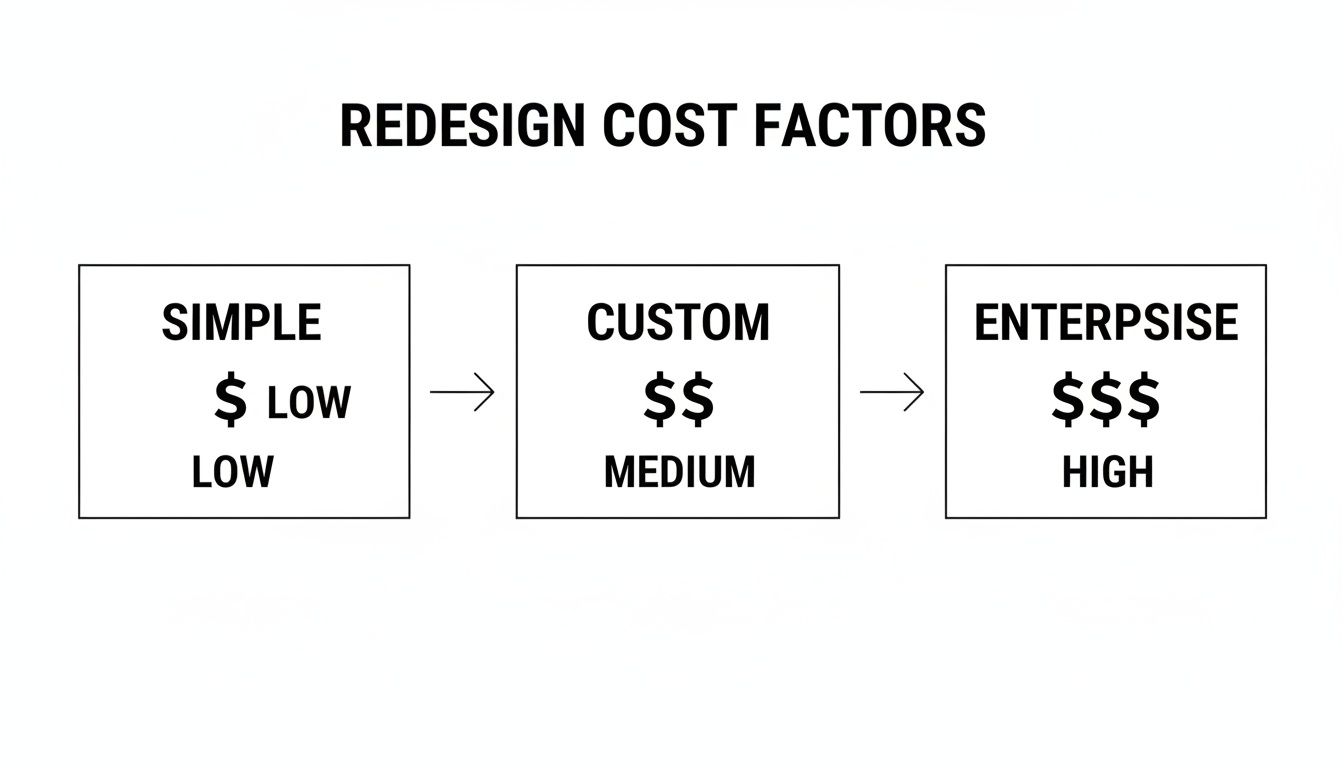
The key takeaway here is that costs are almost entirely driven by the project's scope. A "simple" redesign using a template can be quite affordable, but the moment you start adding custom features and integrations, the project quickly moves into a much higher investment tier.
What’s the Next Move? Making the Call with Confidence
Figuring out the right time to redesign your website isn’t about circling a date on the calendar. It’s a strategic choice, plain and simple, and it has to be rooted in what your business is trying to achieve. We’ve walked through the real-world signals—from sagging performance numbers to a brand that just doesn’t feel like you anymore—that scream it’s time for a change.
You now have a solid framework for making this call. You can see the crucial difference between a full, tear-it-down-and-start-over redesign and a series of smaller, smarter updates. One is for when the very foundation is cracked; the other is for consistent, measured improvement. The right move is whichever one solves the actual problem you’re facing.
At the end of the day, your website has one job: to help you hit your business goals. A redesign is just the tool you reach for when it stops doing that job well. It's a solution, not just a facelift.
With this perspective, you can stop wondering and start planning. It's time to shift from learning to doing.
Your Action Plan Starts Now
Don't get overwhelmed by the possibilities. Just take these three straightforward steps to get the ball rolling. This process will give you the clarity you need to decide on your website's future with total confidence.
-
Do an Honest Audit. Grab the checklist from the last section and give your current site a real, no-holds-barred assessment. Where is it winning, and where is it falling flat? This is all about identifying your biggest pain points and clearest opportunities.
-
Get Your Numbers Straight. You can't fix what you don't measure. Make sure your analytics are tracking the KPIs that actually matter to your business—conversions, bounce rates, organic traffic, you name it. This data is your North Star for every decision you make from here on out.
-
Start the Business Conversation. A website redesign isn't a marketing pet project; it’s a core business decision. Get the right people in a room and start talking about where the company is headed in the next one to three years. Your new website has to be built for that future, not just for today.
Follow this simple path, and you'll be in a prime position to make a smart, informed choice that delivers real results.
Answering Your Top Questions About Website Redesigns
Even when you've got a solid plan, a few big questions always seem to pop up. Let's tackle the most common ones head-on so you can move forward with confidence.
Will a Redesign Kill My SEO?
This is the number one fear I hear from clients, and for good reason. A botched redesign can absolutely wreck your search rankings, wiping out years of hard-earned authority. But here's the thing: when it's done right, a redesign should be an SEO superpower, not a setback.
The real danger lies in changing your site's structure and URLs without giving search engines a heads-up. That’s why a bulletproof 301 redirect strategy is non-negotiable. Think of it like a permanent mail forwarding service for Google. It tells search engines exactly where each old page has moved, ensuring all that valuable ranking power gets passed along to the new URL.
A great redesign is an incredible SEO opportunity. It’s your chance to clean up technical debt, make your site faster, and craft a better user experience—all things Google absolutely loves. The goal isn't just to look better, but to perform better.
To keep your rankings safe (and even improve them), your redesign checklist must include:
- A complete URL map: You need to know where every single old page is going to live on the new site. No exceptions.
- Careful content and metadata migration: All your optimized titles, descriptions, and page content have to make the journey over intact.
- A pre-launch technical SEO audit: Get a baseline of your current site's performance so you can measure the success of the new one.
How Long Does This Actually Take?
It’s easy to think a redesign can be knocked out in a few weeks, but a strategic project that truly moves the needle takes time. Realistically, you should budget for three to six months from the first meeting to launch day. Trying to rush it is the fastest way to get a site that doesn't solve any of the problems you started with.
A professional timeline isn't just one long slog; it’s broken into clear phases:
- Strategy & Discovery (2-4 Weeks): This is where we figure out what we're building and why. We'll dig into your goals, your audience, and what your competitors are up to.
- UX/UI Design (3-6 Weeks): We start mapping out the user journey with wireframes and then bring it to life with a polished visual design.
- Development (6-12 Weeks): The longest stretch. This is where the code gets written, systems are connected, and your content finds its new home.
- Testing & Launch (1-2 Weeks): Before flipping the switch, we hunt down every possible bug to ensure a smooth, stress-free launch.
Skipping or rushing any of these steps just creates headaches later on. Trust the process.
Can't I Just Change My WordPress Theme?
Ah, the theme-swap temptation. It seems so much faster and cheaper, right? But changing a theme is like slapping a new coat of paint on a house with a crumbling foundation. It looks fresh for a minute, but it doesn't fix any of the deep-seated problems.
A simple theme update is a surface-level fix. It won't solve a confusing site structure, a clunky checkout process, or slow, outdated code that's holding you back. You're still stuck with the same core limitations.
A full redesign, on the other hand, is a complete strategic overhaul. We’re rethinking the entire experience to align perfectly with your business goals. It's your chance to build a custom-fit solution that directly solves your biggest challenges, whether that’s boosting conversions, simplifying navigation, or integrating new tools. A theme change is a new outfit; a redesign is a whole new engine.
Ready to stop wondering and start building a website that truly performs? The team at Web Design at NY specializes in creating strategic, SEO-friendly websites for NYC businesses that are built to drive growth. Get a free quote today and see how we can help you achieve your goals.