Your Mobile Application Marketing Strategy for NYC Success


Long before you spend a dime on ads or even write a single line of code, your mobile app marketing strategy has already begun. The real work starts with a deep dive into your market and potential users. This is the foundation that separates apps that launch to a roaring crowd from those that launch to crickets.
Building Your Pre-Launch Foundation

The first marketing task isn't about promotion; it's about validation. For a small business in New York City, this means getting granular. Forget broad assumptions and start digging into the specific needs and wants of your community. A winning strategy is always built on data, not guesswork.
Think of this early research as embedding success directly into your app's DNA. When you get this right, every marketing decision that follows—from your app store description to your social media creative—becomes sharper, more targeted, and a whole lot more effective.
Define Your Niche and Value Proposition
Let's be blunt: the app stores are a battlefield. You're up against over 3.5 million apps on Google Play and 1.6 million on the Apple App Store. Trying to be everything to everyone is a surefire way to get lost in the noise. The only way to win is to get specific.
Instead of a generic "food delivery app," a Queens-based business should think smaller to win bigger. How about an "Artisanal Bakery Delivery App for Astoria"? Suddenly, you've cut through the clutter and have a clear audience. Your value proposition is what makes you the obvious choice for them. What problem are you solving better than anyone else?
- Convenience: Are you saving people from a tedious chore?
- Access: Are you bringing a service to a neighborhood that was missing it?
- Cost Savings: Can you offer a more affordable way to get something done?
- Experience: Is your user journey just flat-out better or more enjoyable?
Answering that question honestly is the bedrock of your entire marketing plan.
Conduct Hyper-Local Competitor Analysis
Once you've carved out your niche, it’s time to size up the competition. I'm not talking about the global giants. I mean the apps that are already popular right here in NYC, or even just in Brooklyn.
Whip up a simple spreadsheet and start digging. For each local competitor, jot down:
- Key Features: What’s their killer feature? And more importantly, what’s clunky or missing?
- User Reviews: Dive into the one-star reviews. What are people constantly complaining about? These are pure gold.
- Pricing Model: Are they free with ads, a one-time purchase, or a subscription?
- Marketing Channels: Where are you seeing them? Check their Instagram, website, and app store pages.
This analysis will quickly show you where the gaps are. Maybe the other local service apps have a terrible booking system, or the local retail apps don't have a loyalty program. Those weaknesses are your openings.
Your competitors' negative reviews are a goldmine of market research. They are telling you exactly what features and fixes potential users are desperate for.
Create Detailed User Personas
A user persona turns your vague target audience ("millennials in NYC") into a real person with real problems. It's a semi-fictional profile, but it’s grounded in the real data you just gathered.
Let’s imagine an app for Queens residents. You might create "Alex from Jackson Heights":
- Demographics: 32-year-old, commutes to Manhattan for work, lives in a shared apartment.
- Goals: Wants to support local shops but is addicted to the convenience of mobile ordering.
- Frustrations: Hates the long weekend line at his favorite coffee shop; finds big delivery apps charge insane fees for small orders.
- Tech Habits: Discovers new local spots on Instagram; checks Google Maps reviews before trying anything.
Boom. This single profile tells you exactly what to build (like a "skip the line" feature) and how to market it (targeted Instagram ads in the 718 area code). It makes every decision feel tangible and user-focused.
And before you even think about launching, start capturing that interest. Our guide on how to build an email list is a great place to learn how to gather those first crucial contacts.
Making Your App Pop: A Guide to Local App Store Optimization
Think of App Store Optimization (ASO) as SEO, but for your app. It’s hands-down the best organic tool you have for getting found by people actively searching the Apple App Store and Google Play. A smart ASO strategy is what makes your app show up first when someone in Manhattan is looking for exactly what you offer.
This isn't about trying to trick the system. It's about being incredibly clear about what your app does, both for the app store algorithms and for your potential customers. Nail this, and you'll see a consistent flow of high-quality, organic downloads without blowing your budget on ads.
Finding the Right Local Keywords
The bedrock of any ASO strategy is keyword research, but for an NYC business, it needs a serious local spin. You’re not just going after "food delivery." You’re targeting "late night food delivery Bronx" or "vegan bakery Brooklyn."
Start by putting yourself in your customer's shoes. What would "Alex from Jackson Heights" actually type into the search bar? Think about specific neighborhoods, landmarks, or even local slang. While tools can show you search volume, don't get hung up on massive national keywords. Your real goal is to own the local search results that actually convert.
- Go for Long-Tail Keywords: Focus on specific phrases like "24-hour locksmith Queens." They have way less competition and attract users who know exactly what they want.
- Spy on Your Neighbors: Check out the app titles and descriptions of your direct local competitors. What words are they using over and over?
- Listen to Your Users: Read the reviews on competing apps. Real customers often describe an app’s purpose using words you might never have thought of.
This whole process is a lot like traditional website SEO. In fact, if you have a handle on the basics of how search engines work, you've got a head start. While your focus here is on the app stores, understanding general Search Engine Optimisation strategies will give you a solid framework for boosting your app's visibility.
Building Your App Store "Storefront"
Once you’ve got a solid list of local keywords, it’s time to put them to work. Your app store listing is your digital storefront, and every single piece of it needs to be fine-tuned to turn a casual browse into a download.
Your App Title and Subtitle
The app title carries the most weight in ASO. If you can, squeeze your most important local keyword right in there.
| Element | Good Example | Why It Works |
|---|---|---|
| Title | QNS Coffee – Order Ahead in Queens | States the brand, what it does, and where it does it. Perfect. |
| Subtitle | Skip the Line at Astoria & LIC Cafes | Hits secondary keywords while showing a clear benefit. |
The App Description
Here’s where you get to sell your story. Weave your secondary keywords in naturally while you explain your app's value. Use short, punchy paragraphs and bullet points to show off your best features. Make it easy to scan.
Icon and Screenshots
Visuals are everything. Your icon needs to be simple, memorable, and stand out in a crowded list. Your screenshots should tell a story. Walk the user through the app experience and show them why it's a must-have for any New Yorker. Use text overlays on the images to call out key benefits like "Free Delivery in Manhattan" or "Book Appointments in Seconds."
Don't sleep on your visuals. A great icon and compelling screenshots can boost downloads by over 50%. They aren’t just decoration; they’re powerful conversion tools.
Building Trust with Ratings and Reviews
Good ratings and glowing reviews send a massive signal to users and the app store algorithms that your app is the real deal. Nobody wants to be the guinea pig for a buggy app, especially when there are a dozen other options.
Gently encourage your first wave of users to leave feedback. A simple, well-timed in-app prompt—maybe after they complete a purchase or successfully use a feature—can work wonders. A steady flow of recent, positive reviews is one of the strongest local trust signals you can build. It's a critical piece of the puzzle, much like the factors detailed in our guide to local SEO ranking factors.
Executing a Buzzworthy App Launch Plan
A powerful launch doesn't just happen on day one. It’s the result of weeks, sometimes months, of groundwork building anticipation so you have an audience ready and waiting. For a small business in a place like NYC, this pre-launch phase is all about creating a local groundswell. You want people to be genuinely excited to download your app the second it hits the stores.
Launching to crickets is the biggest mistake I see. A smart marketing strategy turns your app release into a real event. It all comes down to having a solid plan to capture interest early and make a splash in a market that's already incredibly crowded.
Build Your Pre-Launch Hub
Your first order of business is to get a simple, effective landing page up. This isn't your full website; think of it as a single-page teaser dedicated to one thing: getting people excited about what’s coming.
This page needs to nail your app's value proposition. What problem are you solving for New Yorkers? Use great visuals and sharp, concise copy. If you're launching a restaurant app for Queens, you might show off exclusive deals or a slick "skip the line" feature.
Most importantly, your landing page absolutely must have a clear call-to-action to collect email addresses. You need to give people a good reason to sign up, like:
- Exclusive early access before the general public.
- A special launch-day discount or some free in-app credit.
- Entry into a giveaway for a local prize—think tickets to a show or a gift card to another neighborhood spot.
This email list will quickly become your most valuable asset. It's a direct line to your most eager potential customers, letting you build a real connection before they've even used the app.
Generating Early Local Buzz
Once your landing page is live, it's time to drive the right kind of traffic. Your goal is to find the digital corners of NYC where your ideal users are already hanging out.
Start by looking for local influencers and bloggers. I'm not talking about big-name celebrities. You want micro-influencers who have a real, dedicated following in your niche—a Brooklyn food blogger, a Bronx fitness junkie, or a fashion expert from Manhattan. Reach out and offer them a sneak peek. A single, authentic post from the right local voice can create more meaningful buzz than a huge, generic ad campaign ever could.
At the same time, get active in local online communities. Find relevant Facebook groups for specific neighborhoods (like "Astoria Moms" or "Upper West Side Foodies") or dive into active subreddits. The key here is not to spam your link. Join the conversation, be helpful, and only share your app when it genuinely solves a problem being discussed.
While you're building this pre-launch hype, your App Store Optimization (ASO) should be well underway. It’s a parallel process, not an afterthought.
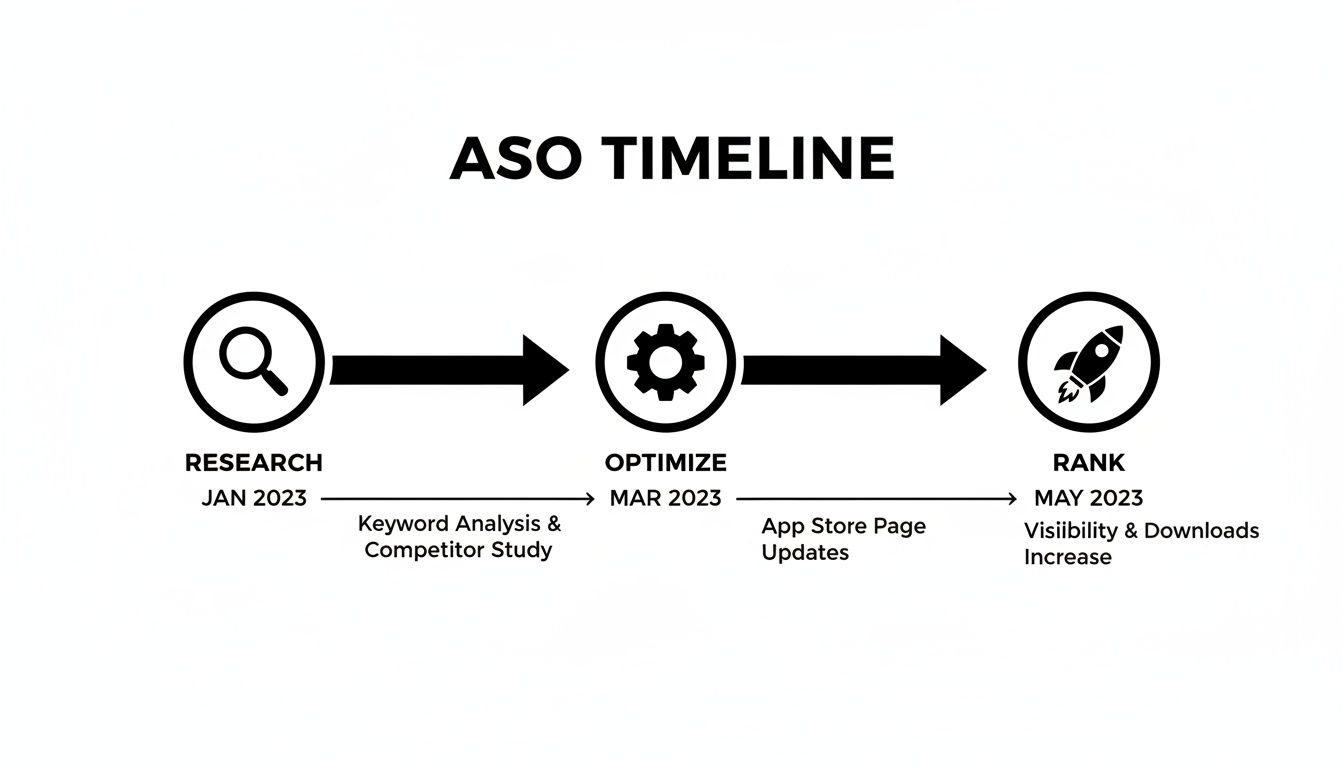
This timeline shows that ASO isn't something you just set and forget. It's a constant cycle of research, tweaking, and tracking to make sure you're climbing the app store ranks.
Your Launch Day Checklist
When the big day finally arrives, your mission is to orchestrate a coordinated promotional blast across every channel you have. This is a moment where timing and execution are everything.
A well-planned launch day isn't just about flipping a switch. It's about creating a concentrated burst of activity. This signals to the app store algorithms that your app has momentum, which can give your initial rankings a serious boost.
Your checklist should be a precise battle plan:
- Unleash the Email Blast: Hit "send" on a launch announcement to your pre-launch email list. Remind them about their exclusive offer and provide direct download links for both the Apple App Store and Google Play Store.
- Go Live on Social: Announce the launch on all your social profiles. Post your best visuals, maybe a short video demo, and use relevant local hashtags like #NYCtech, #QueensEats, or #MadeInNYC.
- Update Your Website: Put prominent banners and pop-ups on your main business website, driving all that existing traffic straight to your new app store pages.
- Activate Your Press Contacts: Circle back to the local bloggers, journalists, and influencers you connected with. Give them the official news and an easy-to-use press kit with screenshots and key info.
- Engage, Engage, Engage: Keep a close eye on all your channels for comments, questions, and reviews. Responding quickly shows you're on the ball and helps build a positive community right from the start.
The mobile app world is massive—global downloads recently hit 218 billion, a 7% jump year-over-year. As you can discover more insights about mobile app growth on amraandelma.com, those numbers show a huge opportunity for local businesses to connect with customers where they spend their time. A strong, structured launch is more critical than ever to grab your piece of that audience and set yourself up for long-term success.
Driving User Acquisition in a Competitive Market
Alright, your app is live. The launch party is over. Now, the real work begins. Getting a steady stream of new users is the name of the game, and you need to do it without an enterprise-level budget.
The secret isn't outspending the big players; it's about being smarter and more focused. A solid mobile marketing strategy combines the quick wins of paid advertising with the lasting power of organic growth. This is how you attract high-quality downloads from real people in NYC who will stick around.
Cost-Effective Paid Acquisition for Local Reach
Paid ads give you a direct line to your audience. For a local business, the magic is in hyper-targeting. Forget casting a wide net across the country. We're talking about zeroing in on specific boroughs, neighborhoods, or even a few zip codes in Queens. This precision ensures every dollar you spend is reaching a potential customer just around the corner.
The numbers are staggering. Global mobile ad spending has climbed to $402 billion, and the U.S. market is on track to hit $228 billion. You can dig into more mobile marketing statistics here to see the full picture. The takeaway? This is where the game is being played, and powerful ad platforms give you a fighting chance.
Mobile Ad Channel Comparison for NYC Small Businesses
So, where should you put your ad dollars? Each platform has its strengths, especially when you're trying to capture a local NYC audience. Think about who you're trying to reach and what you want them to do.
This table breaks down the top contenders to help you decide.
| Channel | Best For | Targeting Capabilities | Typical Cost | Key Metric |
|---|---|---|---|---|
| Meta Ads | B2C apps, local services, e-commerce, community building. | Unbeatable for demographic, interest, and behavior targeting. Can target by zip code, "people who live here," and specific interests like "Queens foodies." | $0.50 – $3.00 per click (CPC). Installs can range from $2 – $7. | Cost Per Install (CPI), Conversion Rate |
| Google Ads | Almost any app, especially those solving a specific problem people search for. | Promotes across Search, Google Play, YouTube, and Display Network using machine learning to find high-intent users. Strong location and keyword targeting. | Varies widely. Search CPC can be $1 – $5+. CPI is often $1 – $5. | Install Volume, In-App Actions |
| Apple Search Ads | iOS apps looking for high-intent users at the moment of decision. | Places your ad at the top of App Store search results for specific keywords (e.g., "NYC coffee shop app"). Simple, direct, and highly effective. | Can have a lower CPI ($0.50 – $3.00) but less scale than Google/Meta. | Tap-Through Rate (TTR), Cost Per Acquisition (CPA) |
Ultimately, the "best" channel depends entirely on your app and your ideal customer. A coffee shop loyalty app will crush it with Meta Ads targeting people within a 1-mile radius, while a B2B service app might find more success with highly specific Google Search campaigns.
Harnessing Organic Growth Through Content
Paid ads get you traffic today. Organic growth builds an asset that pays you back for years. This is the long game, focused on creating genuinely useful content that attracts people naturally. It’s a slower burn, but the ROI can be massive.
The core idea is simple: solve your users' problems before they even know they need your app. Think about what your target audience in NYC is typing into Google. Someone searching for "best brunch spots in Brooklyn" isn't looking for your restaurant's app… yet. But a great blog post on that exact topic can grab their attention and introduce your app as the perfect tool to book a table.
This is where your website and app marketing need to work hand-in-hand. Good content helps your website rank, creating a powerful funnel that drives app downloads. Every article is a chance to add a call-to-action, nudging readers to download your app for a better, more convenient experience.
Your blog isn't just a marketing tool; it's a bridge. It connects the problems your audience is searching for on the web to the solution you provide in your app.
Balancing Your Acquisition Strategy
The smartest mobile marketing doesn't pick a side—it blends paid and organic channels seamlessly.
Use paid ads to get that initial burst of traffic, test what resonates with users, and gather crucial data quickly. The insights you get from a two-week Meta campaign—which ad copy worked, which audience converted best—are pure gold for refining your long-term organic strategy.
To get a bird's-eye view of how all the pieces fit together, check out these Top Mobile App Marketing Strategies to Boost Downloads. Seeing the bigger picture can help clarify your next steps.
At the end of the day, user acquisition is a continuous loop. Paid campaigns boost your app's visibility, which signals to the app stores that you're relevant. That improved ranking, combined with your steady organic content, helps you attract even more users. This balanced approach is the foundation of any successful local marketing strategy and the key to building a healthy, growing user base.
Boosting Engagement and Long-Term User Retention
Getting someone to download your app is a huge win, but let's be honest, it's just the starting line. The real test of a great mobile app strategy is keeping those users around. The numbers don't lie, and they can be brutal: on average, a shocking 5.7% of users are still active 30 days after installing an app.
This is where retention marketing comes into play. It’s all about creating a valuable, ongoing dialogue that keeps people opening your app day after day. For a local NYC business, this means turning a one-time download from someone in Brooklyn into a loyal customer who uses your app every single week.
Master the Art of the Push Notification
Push notifications are your most direct line to your users, but you're walking a fine line between being helpful and just plain annoying. Get it wrong, and you’re on the fast track to getting uninstalled. The secret is to deliver real, timely value, not just generic pings.
Forget the lazy "Don't forget about us!" messages. Get specific. For a Queens coffee shop app, a killer push notification is something like, "It's cold out in Astoria! Warm up with a free espresso shot on your next mobile order." See the difference? It's contextual, valuable, and prompts an immediate in-app action.
Here are a few ways to make your notifications actually count:
- Segment Your Audience: Stop sending the same message to everyone. Group your users by behavior—newbies, your regulars, or even people who haven't logged in for a week.
- Personalize the Message: A little personalization goes a long way. Using their name or referencing a past purchase makes the notification feel like it was crafted just for them.
- Offer Exclusive Value: Give them deals, early access, or info they can't get anywhere else. Make opening your app feel like an inside scoop.
A great push notification feels less like an ad and more like a helpful tip from a friend. It should answer the user's silent question: "What's in it for me?"
Use Email Automation to Nurture Relationships
Don't sleep on email. It's still a powerhouse for building deeper connections. Unlike a fleeting notification, an email gives you the space to tell a story, share tips, and guide users to your app's best features. A few simple automated campaigns can work wonders for your retention rates.
Your first priority should be a solid welcome series. I'm talking about an automated sequence of 2-3 emails that goes out right after a user signs up. Don't just say "welcome"—use these emails to get them to take specific, valuable actions.
A simple welcome flow could look like this:
- Email 1 (Immediately): A warm welcome that confirms their signup and points them to the single most important thing they should do first.
- Email 2 (Day 3): Share a quick tutorial or "pro tip" that shows off a feature they might have missed. Help them get more out of the app.
- Email 3 (Day 7): Hit them with some social proof, like a glowing review, or a special introductory offer to nudge them toward their first purchase.
This kind of automated sequence ensures every new user gets a consistent, helpful onboarding, which dramatically increases the odds they'll stick around for the long haul.
Leverage In-App Messaging for Real-Time Guidance
Push notifications and emails are for bringing users back to the app. In-app messages, on the other hand, are for engaging them while they’re already there. These are the little pop-ups, banners, or tooltips that appear right inside the app itself.
In-app messaging is incredibly effective for guiding users and getting feedback without interrupting their flow. For example, when a user taps on a new feature for the first time, a small pop-up can quickly explain how it works. This contextual help makes the experience smoother and kills potential frustration.
You can also use in-app messages to:
- Announce new features or updates to your most active users.
- Collect quick feedback with a short, one-question survey after they complete a task.
- Promote special offers relevant to the exact screen they're looking at.
By combining a smart push strategy, targeted email automation, and helpful in-app messaging, you build a powerful retention engine. Your mobile app marketing stops being just about getting downloads and becomes a complete system for building a loyal, active user base in a cutthroat market like NYC.
A Few Common App Marketing Questions
Even with a solid plan, a few questions always come up. When you're a small business owner here in NYC, you don't have time or money to waste, so you need straight answers.
Let's break down some of the most frequent things I get asked when local businesses dive into marketing their app.
What’s a Realistic App Marketing Budget for an NYC Small Business?
This isn't about pulling a number out of thin air. The smart way to think about it is through your Customer Acquisition Cost (CAC)—what’s a new, active user worth to you?
For a brand-new app launch, a budget in the $3,000-$10,000 range is a practical starting point. That’s usually enough to fund those first paid campaigns and promos to get the ball rolling and attract your initial user base.
My Go-To Advice: Once you're up and running, a great rule of thumb is to reinvest 20-30% of your app's revenue right back into marketing. This creates a sustainable growth loop where the app essentially pays for its own promotion.
The trick is to start small and local. Zero in on a specific area like Queens or even just a few zip codes. Test the waters with a modest budget on platforms like Meta Ads or Apple Search Ads, see what resonates with New Yorkers, and then double down on what’s working.
Should I Focus on ASO or Paid Ads?
This is a bit like asking if a car needs an engine or wheels. You need both, and they work together. It’s your short-game versus your long-game.
-
App Store Optimization (ASO) is your long-term foundation. It’s how people who are actively looking for an app like yours find you organically, without you paying a dime for the click. ASO is incredibly efficient and builds a presence that keeps paying you back for years.
-
Paid User Acquisition is your booster rocket. It gives you immediate traffic, which is essential for getting off the ground, testing your messaging, and learning about your users fast. You simply can't sit around waiting for organic traffic to trickle in when you first launch.
A truly effective strategy uses paid ads to drive that initial wave of downloads. All that activity—the traffic, the downloads—sends positive signals to the app stores. This can actually give your ASO rankings a nice boost. They feed each other.
How Long Does It Take to See Real Results?
This really depends on the channel, so it's important to set the right expectations. You have to be patient and track everything.
With paid ads, you'll see data like clicks and impressions almost instantly—within 24 hours. But getting to the good stuff, like cost-effective downloads and users actually doing things in your app, usually takes a few weeks of serious testing and optimization.
ASO, on the other hand, is a slow burn. You might notice small shifts in your app store rankings a few weeks after you polish your listing. But seeing a real, steady stream of organic downloads? That can easily take 3-6 months of consistent work—updating keywords, getting reviews, and building authority. Content marketing and SEO for your website are on a similar timeline.
Ready to get your app the attention it deserves? The team at Web Design at NY lives and breathes this stuff. We build mobile app marketing plans that get downloads and create loyal users for businesses all over NYC. Let's build your success story together.